Waiting for Mageia 5: Spotlight on UEFI support

This article is addressed to users with some technical background. Summary for the non-techie: Mageia 5 supports UEFI, which means it’s now easier to install it on recent hardware. Bottom line: after the initial installation, which might be a little different (see below), UEFI really shouldn’t trouble you.

What’s UEFI?

UEFI has been around for a few years now, previously called EFI. It is a completely new and different firmware for booting 64 bit PC and replaced the old BIOS firmwares. It brings improvements over old BIOS, but it’s mainly known in the Linux community for rendering the installation of Linux systems more difficult on computers bought with a preinstalled system:

  1. because it necessitated development to support it;
  2. because of a security feature called Secure Boot, which refuses to boot any bootloader that is not signed with an official signing key;
  3. because it’s not always obvious how to boot to a DVD or an USB key (it depends on the firmware, whether Secure Boot is active, whether Fast Startup is active, etc.)

UEFI systems also use a new (to PCs) partitioning format called GPT, with a special EFI System Partition (ESP) which contains the bootloaders.

The references at the end offer fuller explanations.

Mageia and UEFI

With Mageia 4, in order to install to a system with UEFI you had two solutions:

  • activate legacy BIOS compatibility mode, aka Compatibility Support Module or CSM,
  • or follow manual instructions from our wiki, involving command line instructions to run as root during installation. Doable but not easy.

Mageia’s installers are now fully UEFI aware, so you can install easily along with other pre-existing systems.

What about Secure Boot?

First of all, Secure Boot is not UEFI. UEFI is the firmware, Secure Boot is one of the features among others. However, most pre-installed computers come with Secure Boot activated, which prevents users from booting any other system or installation medium. In order to install Mageia, you need to deactivate it in your firmware’s configuration. In order to manage to get to the configuration, see in your computer’s documentation how to proceed. There are lots of resources on the internet covering that subject. As of today, all manufacturers have an obligation to provide a way to disable secure boot.

Installing Mageia on an UEFI system

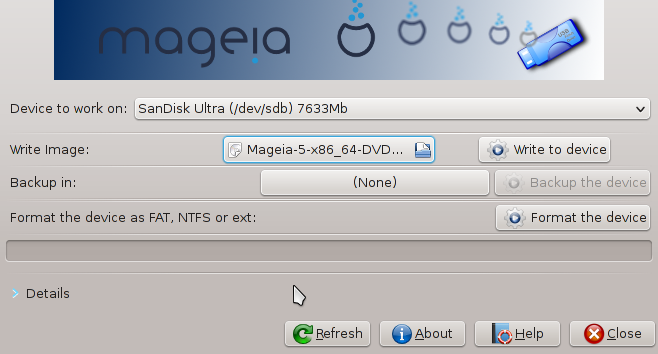
Both the Live and Classic images can be installed on UEFI hardware, but not the Dual arch ISO. Depending on your hardware or preference, just burn the 64 bit ISO image to DVD, or dump it to an USB flash drive. Existing Mageia users can use IsoDumper for this (install isodumper from the software center). For others, check this procedure. See also our dedicated wiki page. Then boot your computer from the prepared medium.

Booting the Classic installer on a UEFI system currently offers menu choices dependent on the boot medium: you need to choose the appropriate boot menu entry whether you’re installing from DVD or USB; this is not necessary for the Live installers. Once launched, there is no difference from non-UEFI for Live usage. Installation differs very slightly in needing to create or use an existing EFI System Partition (ESP) and mount it on /boot/EFI, and there is no choice of bootloader which is automatically Grub2 (grub2-efi). The preparation and deployment of Mageia installation media for UEFI systems is fully covered in our wiki.

Resources about UEFI:

If you are curious to know more, Adam Williamson wrote a good introduction to UEFI; there is also some information about it on our wiki page.

What about upgrade from Mageia 4?

It is not supported to upgrade an instance of Mageia 4 that had been installed in non-UEFI mode towards a Mageia 5 in UEFI mode.
Upgrading from an UEFI Mageia 4 to UEFI Mageia 5 is supported (as well as from non-UEFI Mageia 4 to non-UEFI Mageia 5 of course).

Mageia 5 is almost there, stay tuned!

Posted in Uncategorized | 12 Comments

All things come to those who wait

And we’ve all waited long enough for Mageia 5 RC: go grab it!

While you wait for the download to complete, all restless and eager that you are to try this new release, let’s talk a bit about this release candidate: what can you expect of it, and why did it take so long?

UEFI support – for real

Mageia’s developers have been hard at work during this release cycle to add UEFI support to our installer, while the QA contributors were thoroughly testing everything that they could on their hardware. We are now proud to announce that you can install Mageia on UEFI systems fairly easily, using either our Live media or the classical installer (except from the DualDVD which does not support UEFI).

This is now the trial by fire for the main feature of Mageia 5: if you have a UEFI system, please try this release candidate in as many configurations as possible (dual boot with Windows or with other Linux distributions, etc.). And then please report any bug that you may encounter; we managed to get rid of most of the bugs noticed during this long pre-release testing, but our QA testers have relatively limited hardware resources.

Spring cleaning in the installer

Though it’s probably the most awaited feature, UEFI support is not the only improvement that was made in our installer, DrakX. The intensive testing done by the QA team over the last months brought a good deal of long-standing bugs to light, and a lot of work has been poured into fixing these issues: RAID support, GRUB 2 integration, graphical issues linked to GTK+ 3 evolutions, more logging and debugging features for urpmi and the installer… you name it!

For instance, we improved the default partitioning features to better reflect the needs of our users: the ready-made options to “erase and use the entire disk” or “use the free space” will now create a bigger root partition (up to 50 GB if you have a ton of free space, against 12 GB in previous releases). The “use free space on a Windows partition” option will also be less shy of using free space on NTFS partitions, letting you have a comfortable root partition if you want to install several desktop environments or some of the nice open source games shipped with Mageia 5.

Our most tested release so far

With over two months of development and testing, this release candidate is our most tested release so far, and we do hope that it will make Mageia 5 our most stable and mature release. The freeze period has been longer than anticipated, so you won’t find the most recent packages such as Kernel 4.0; on the other hand we are pretty confident that we have reached a good compromise between being cutting-edge and stable. Our packagers kept working on providing important bugfix releases and security fixes, while trying to make sure not to add any avoidable regression, and all in all Mageia 5 should satisfy both casual and power users.

An impressive team work between the devs and the QA testers

The testing period for this release candidate was like an endless game of table tennis, with developers on one side working hard on fixing release critical issues, and ISO testers on the other side, always running into new (and old) issues and making sure that the bug fixes were effective. A big thanks to all those involved in this tiring but rewarding testing period; we definitely set a new record with 9 rounds of RC ISOs tested over two months!

Special kudos to our QA team, and especially its newest members who joined during the Mageia 5 release cycle, for managing to keep testing update candidates for Mageia 4 while working on the RC ISOs.

Now it’s your turn

With so much development done between our 3rd beta and this release candidate, there is a lot to test and we need as much hardware covered as possible, especially to test UEFI support and other installer changes. So grab your copy, prepare your booting device and get started with Mageia 5 RC! Please have a look at the errata too, since there are already known issues that we couldn’t fix yet, and report any bug that affects you and that you can’t find in the errata or our Bugzilla.

Posted in community, Mageia, QA, release | 24 Comments

Mageia at the Chemnitz Linux Days 2015

CLT2015On Saturday 21st and Sonday 22nd of March, Mageia will be present at the Chemnitz Linux Days 2015 (Chemnitzer Linux-Tage, CLT 2015).

As longstanding exhibitors we are glad to participate once again to one of the biggest free software community meeting in Germany after one year of absence. There you will have the possibility to get a preview of our upcoming Mageia 5 release and discuss all aspects of the Mageia project.

The wide program contains a lot of different talks, workshops for young and old and a lot of other interesting projects will present their work. You will find the complete program here.

We are looking forward to see you at the CLT 2015!

Posted in community, events, Mageia, users | 5 Comments

Mageia at the Free Software Days in Lyon (JDLL 2015)

jdllOn Saturday 28th and Sunday 29th of March, the association for the development of free information technology of Lyon (France) organises a two-days event called Free Software Days (actually, it’s “Les Journées du Logiciel Libre”, in French), also known as JDLL.

Users and contributors of Mageia will hold a stand there, as they do every year since the distribution started. It’s an excellent opportunity to meet each other, and you will also find some goodies like tee-shirts and stickers of your favorite distribution. If you happen to live near Lyon or are passing by, join us for a talk!

There will also be conferences and workshops. The program and other practical information can be found at the JDLL’s website: http://www.jdll.org.

The whole event is free and will be mostly French-speaking. But if you don’t speak that language you’ll find people able to talk in English too.

See you soon! And for others: prepare to test the Mageia 5 Release Candidate (RC) as soon as it is available. Let’s make it a wonderful release!

Posted in community, events, Mageia, users | 5 Comments

Bad luck or Valentine gift: Mageia 5 beta 3 is out!

uselessThe release date was a close call between Friday, the 13th and Valentine’s day… but finally, Mageia 5 beta 3 is available for tests. You will find more information about it on the Release Notes page.

The road was long and strewn with pitfalls, but the Mageia community is just great and the ISOs are finally available.

After a looooong meeting dedicated to the review of all release critical bugs, a lot of fixes were released that allowed us to finalize beta 3.

EFI is now supported properly on all 64-bits ISOs, but we still need your feedbacks on this.

This is now the home stretch. We do need your help more than ever. Please report any problems that you experience in the forums, mailing lists or, preferably, in Bugzilla. Also, don’t forget to check the Errata.

(Image source: xkcd)

Posted in alpha, bugsquad, Mageia, QA, release, test | 14 Comments