


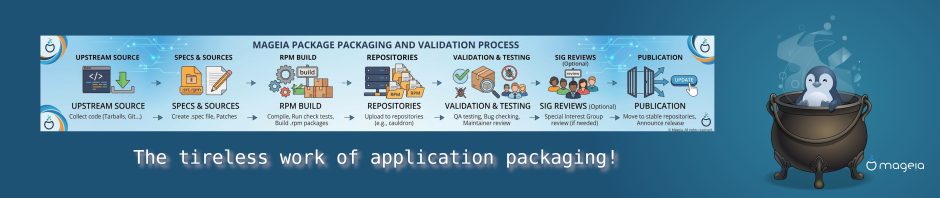
This week, we’ve been concocting a potion using a few ingredients provided by our brilliant team of developers and packagers. The way applications are managed and packaged in Mageia, compared to other competitors, makes system management and software usage very straightforward for our users. The implementation of graphical tools such as the Mageia Control Centre forms an important part of the system, but what is not widely known is how certain applications are packaged compared to other systems, how the inclusion of plugins and software extras for applications is handled, and how dependencies are managed throughout the packaging process. Let’s get started!
Conceptual Principles
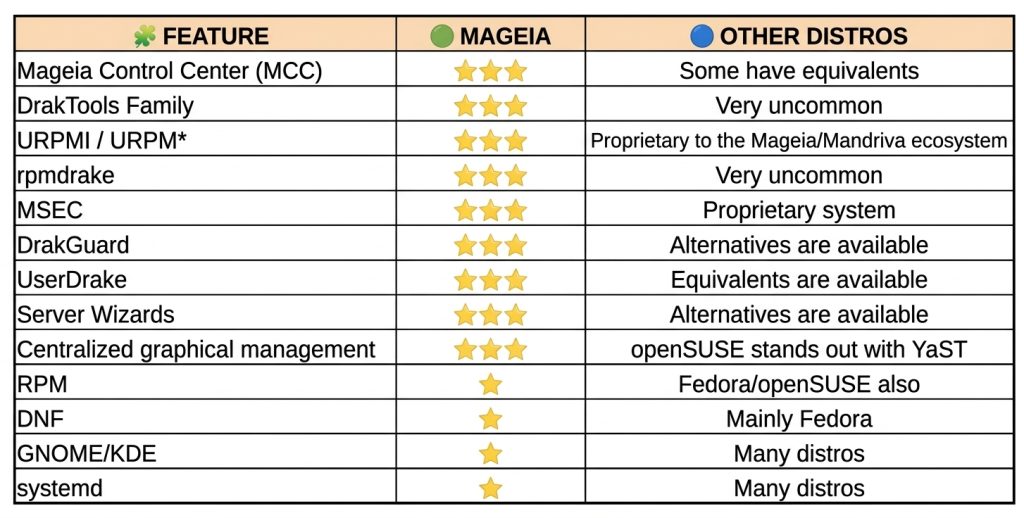
Mageia has inherited and refined the Mandriva/Mandrake packaging philosophy; our aim is to deliver ‘ready-to-use’ applications, without skimping on optional features or add-ons. Other distributions tend to package applications in their lightest version, leaving out plugins or add-ons, which forces the user to search for extra packages. In Mageia, we often include plugins, integrations and multimedia support directly within the application or under a single metapackage.
Mageia is characterised by an integrated packaging philosophy: rather than splitting a programme into multiple sub-packages or applying strict licence restrictions in the main repository, Mageia’s maintainers compile the software with as many extensions, filters and hardware support features enabled by default as possible, provided these add extra functionality to the application and are approved by the packaging team.
Our installer
In Mageia 10, we currently have URPMI (User RPM Installer), which is our default package manager and the backbone of both the graphical and terminal-based application installation processes, although native support for DNF (now DNF5) is also included.
URPMI has a number of advantages over its competitors, such as:
- It uses very lightweight summary files containing only the data essential for resolving dependencies, allowing repositories to be queried or refreshed almost instantly, even on slow connections.
- It does not need to store the full description and information for each package locally unless required, saving disk space in the indexes.
- One of its greatest advantages is not just the command line, but the fact that the graphical package manager ‘rpmdrake’ shares the same engine. In other managers, the graphical tools act as independent wrappers that sometimes conflict or do not reflect the same statuses of orphaned packages.
- Urpmi has spent decades refining its algorithm for detecting orphaned packages left behind after uninstalling an application, adapting it to Mageia’s RPM package structure; this prevents critical system libraries from being uninstalled by mistake during the clean-up process.
DNF has also been enabled in Mageia due to a number of modern features:
- Transaction history.
- Modules and AppStream. Better integration with modern software repositories.
- Active upstream support. It is maintained directly by the rpm.org project.
Some urpmi commands in the terminal:
- urpme: to remove packages.
- urpmq: to list packages.
- urpmf: to search for packages containing specific files or capabilities.
- urpmi: for installation and updates.
A brief diagram
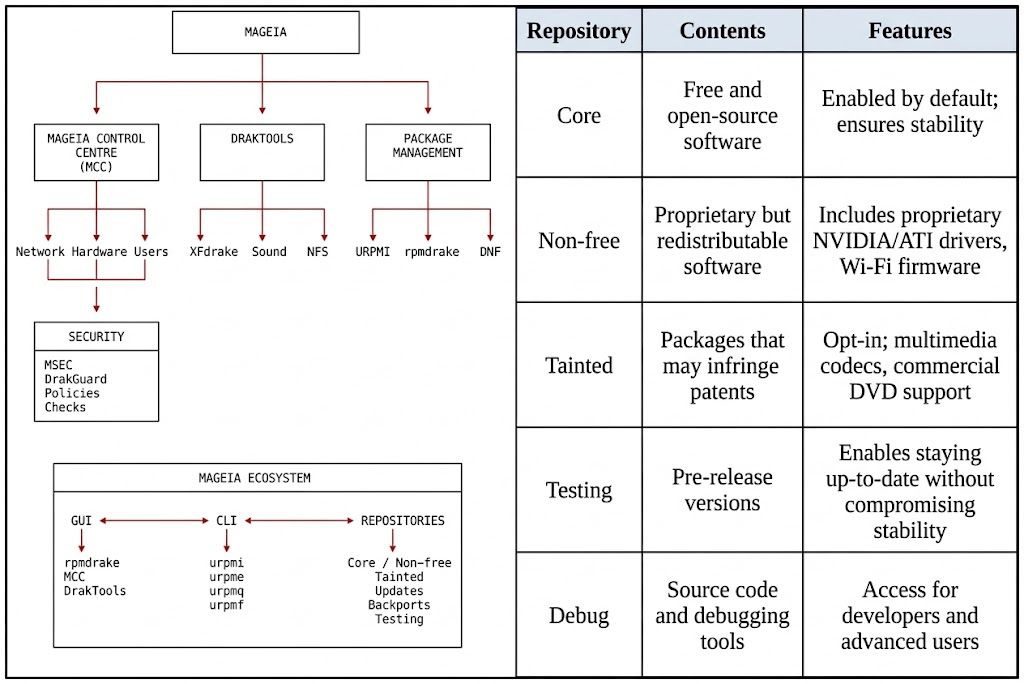
At Mageia, through our repository sections, we package versions of programmes that are compiled from day one with support enabled for, for example, all networking modules, streaming protocols and hardware-accelerated video, as well as numerous proprietary or obscure image formats that other distributions move to secondary repositories or remove altogether. End-user convenience is prioritised over strict ‘purity’ in packaging; provided that an add-on makes the packaged application more useful, this is largely due to the official ‘Tainted’ repositories dedicated to software subject to patents or legal restrictions in certain countries, which allow applications to be packaged in their full version without restricting functionality.
Mageia maintains the build infrastructure, dependencies, policies and controls to ensure that the packages form a coherent system.
A clear example of this is the “gimp-plugin-astronomy” package, which remains available for installation until the end of support for Mageia 9. Although it is no longer maintained by its creators, Mageia has continued to provide it for our users until the release of GIMP 3.0, with which it is no longer compatible due to the switch to Python 3.
Some other examples:
- LibreOffice. In other distributions, it is packaged as separate components, and features such as icon themes, database integration or desktop environments are omitted.
- Inkscape. In Mageia, it includes a dependency map that enables, by default, all extensions for mathematical rendering, bitmap processing and the import/export of CAD files, without the need to search for other Python libraries.
- Audacity, VLC, Kodi. Through the various repositories, they are packaged with support enabled for features that do not appear in other distributions.
- Pidgin. We’ve already discussed this application elsewhere. The Mageia package is very comprehensive, featuring many plugins and messaging protocols not found in other distributions.
A vision for packaging in Mageia
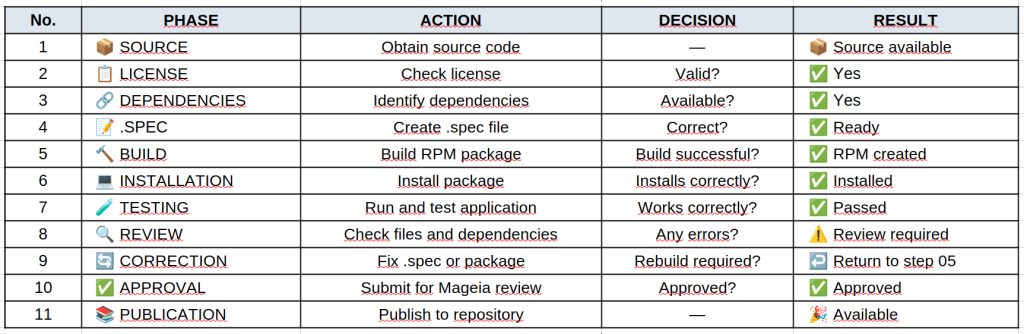
Behind the packaging process, there are defined policies and review procedures through which we aim to ensure the software fits into the system, rather than simply distributing the packages as published by the developers.
Some key features of our packaging:
- Python. Clear conventions, pyproject, noarch, documentation and dependencies managed by RPM:
- Java. We avoid duplicate JAR dependencies and maintain separation of components.
- Firefox. Main package and separate translations. The required language is installed based on the system language.
- LibreOffice. Installation of the entire suite and the required language based on the system language, in a single metapackage, or separate installation of individual applications.
- Libraries. Separation of runtime, development and dependencies.
- KDE/Qt applications. Specific policies for names, libraries and components.
- Licences. We maintain separation of licences via the ‘Core/Nonfree/Tainted’ repositories.
- Updates validated by the QA team before reaching the stable release.
What does all this mean for the user?
Most of these decisions do not appear in a screenshot. They do not, on their own, make Plasma’s animations better or cause Firefox to open any faster.
Their value becomes apparent in more everyday situations:
- Installing an application and automatically obtaining the correct dependencies.
- Uninstalling it without leaving behind stray files.
- Updating a library without ending up with multiple incompatible copies.
- Installing only the languages we need.
- Installing documentation only when we’re interested in it.
- Having separate development packages.
- Maintaining a consistent software base.
- Receiving updates that have gone through a validation process.
In other words, our users don’t have to constantly think about packaging. If the job is done properly, it simply works.
Conclusions
The main strength of our packaging lies in the way all our teams work together to ensure that each programme fits seamlessly into the whole.
Packaging policies, the separation of components, the handling of dependencies, the careful management of third-party libraries, licence management and the quality control process all form an integrated and coherent system.
The work carried out by our packaging, development and quality assurance teams, whilst not visible to our users or the general public, is one of the most important factors in making our distribution a truly stable and reliable Linux distribution. A great deal of engineering work goes into ensuring that everything fits together to achieve the final result.
